

December 03, 2018

How To Create The Perfect Ergonomic Set Up

Details

With office workers spending more time at their desk than anywhere else, it is important that its design suits the user. The arrangement must be appropriate for the work they perform. By providing the right equipment that is easily adjustable, you reduce the risk of ergonomic-related injury. This also helps to promote employee health and wellbeing in the long term. Here are a few tips on setting up your workstation correctly.

Here are a few tips on setting up your workstation correctly:

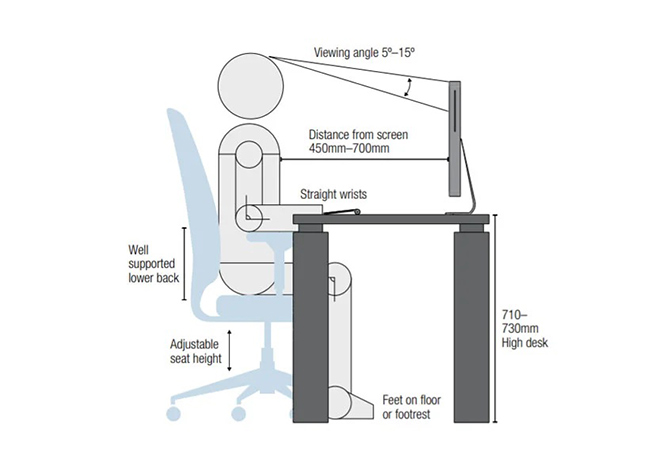
  • An office chair should be chosen based on the ability for a user to interact comfortably with their work environment. Sitting with your knees at a 90 degree angle with your feet flat on the floor or supported by footrest, leaving a gap of 2cm between the back of your knees and the chair and raising or lowering the back of the chair so it provides maximum lower back support ensures the best ergonomic seat is created.

How To Create The Perfect Ergonomic Set Up - /media/Blogs/Feature/How-To-Create-The-Perfect-Ergonomic-Set-Up_feature.jpg - Main Image
  • Your desk should allow room for all necessary equipment to be used comfortably without the need to continuously bend and twist your body. Many workplaces are integrating height adjustable desks to allow more flexibility in sit/standing positions to promote productivity and assist in a healthy ergonomic environment.

  • Your keyboard should approximately be at elbow level with your mouse close to maintain a straight, neutral wrist posture. Position both so your arms rest comfortably at your sides or elevating your chair to meet this angle relieves pressure on your wrists and fingers.

  • Position the keyboard and mouse directly in front of you and the monitor. The top of the screen should be just below eye level and titled to minimise the glare. Adding monitor arms allows for more flexibility in movement to ensure the correct ergonomic position is established.

The top of your monitor screen should be just below eye level and tilted to minimise glare. Adding monitor arms allows for more flexibility in movement. This ensures the correct ergonomic position is established and maintained throughout the workday.

Related Articles

Continue exploring our latest insights on commercial design and workplace culture.

Take the Next Step

Ready to move forward? Request a physical catalogue, visit our online store, or talk to one of our experts today.
Talk To an Expert

Get expert advice for your next project.

Request a Catalogue

Order our latest print or digital guide.

Ready to Order?

Shop in-stock items for immediate dispatch.